
📸 A termék oldalán található képek némely esetben illusztrációk, ezek a valóságban eltérhetnek.

EaseUS MobiAnyGo
📝 Termék leírása
Set Virtual Location on Your iPhone in One-Click There are several reasons why you want to change the current location on an iPhone, iPad, or iPod. Sometimes, tracking locations may appear to be inconvenient or oppressive.
Whenever you want to hide your current location from others for safety purposes or to access videos, movies and others on location-based apps for entertainment purposes, EaseUS MobiAnyGo provides an easy and cost-effective way for you to change GPS on your iOS or iPadOS device without jailbreak. Change GPS for privacy and reach services on location-based appsAre you looking for a perfect solution when you go outside alone and need to hide your true path for safety purposes?
Do you want to match more friends on dating apps? EaseUS MobiAnyGo can easily change your GPS.
Simple than ever! Work with location-based apps such as AR games, social platforms, etc.
Reset your location on the map to anywhere to stop being tracked. Mock location on dating apps.
Share virtual locations on social platforms. Simulate GPS - Movement with Customized Speeds Set you free from GPS restrictionWhen you are playing an AR game, it may require you to go outside.
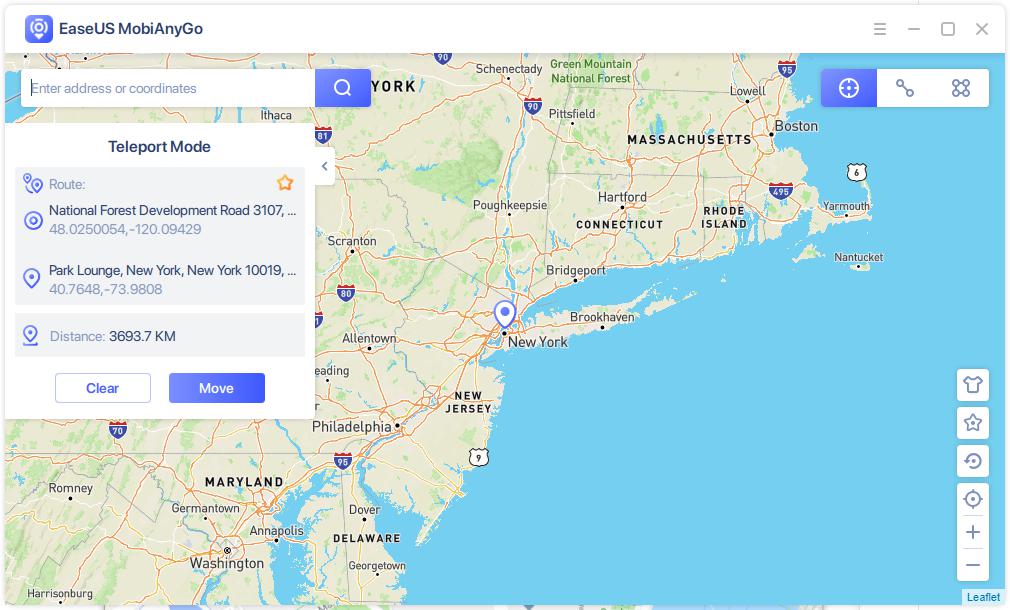
EaseUS MobiAnyGo enables you to move from one place to another with a desired speed. Plan routes in two-spot and multiple-spot modesYou can change your locations and repeat the movements automatically as many times as you want.
Simulate real path speedWith EaseUS MobiAnyGo, you can totally make your route like a real path by stimulating the walking speed, cycling speed, and driving speed, even pause it during the movement. Features: Automatic RouteOne-click to make the GPS spot move automatically.
Set CoordinateSelect a specific location by name or by entering its coordinates Support Up to 5 devicesAllow managing the GPS Location on five different iOS devices. Save Commonly-Used LocationsSave the locations you like or use most frequently.
It is convenient for the next quick action.
📋 Általános használati útmutató
A termék aktiválásához kövesd az adott platform hivatalos útmutatását:
- 🎮 Steam
- 🎮 Origin / EA app (új néven: EA app)
- 🎮 Epic Games
- 🎮 Ubisoft Connect (régi nevén Uplay)
- 🎮 GOG (Good Old Games)
- 🎮 Battle.net (Blizzard)
- 🎮 Rockstar Games Launcher
- 🎮 Microsoft Store / Xbox
- 🎮 PlayStation Store
- 🎮 Nintendo eShop
Megjegyzés: A termék aktiválása után azonnal elérhető lesz a fiókodban.
